Troubleshooting CA ARCserve D2D › CA ARCserve D2D-Related Problems › CA ARCserve D2D Service could not be started because of port conflict
CA ARCserve D2D Service could not be started because of port conflict
The port being used by CA ARCserve D2D may conflict with the default port being used by Tomcat. This conflict will cause Tomcat to fail when CA ARCserve D2D is started before it. To remedy this problem, you can change the Tomcat default port as follows:
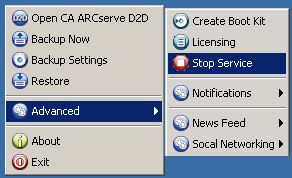
- Access the CA ARCserve D2D Monitor, click the Advanced option, and select Stop Service.
The CA ARCserve D2D Web Service is stopped.
- Access the Tomcat server.xml file to edit/configure the behavior of Tomcat.
The Tomcat server.xml file is located in the following folder structure:
C:\Program Files\CA\ARCserve D2D\TOMCAT\conf
- Locate the <Server> tag inside server.xml file.
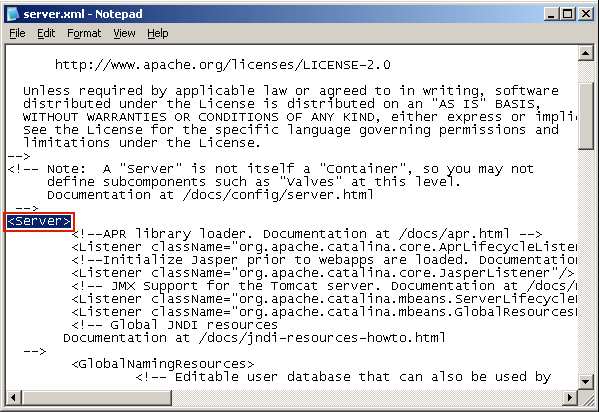
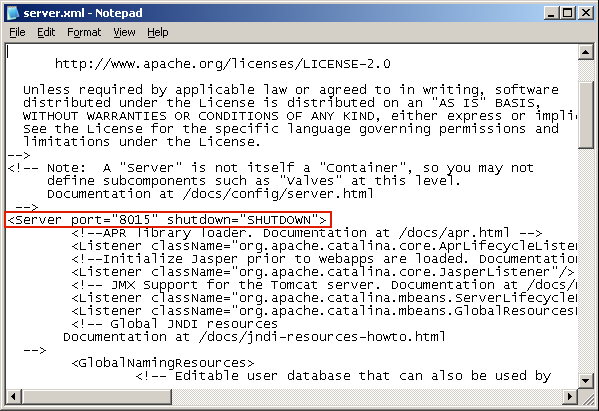
- Edit the <Server> tag as follows:
From:
<Server>
To:
<Server port="8015" shutdown="SHUTDOWN">
- Save and close the server.xml file.
The command to shut down Tomcat has now been configured so that it must be received by the server on the named port (8015).
- Access the CA ARCserve D2D Monitor, click the Advanced option, and select Start Service.
The CA ARCserve D2D Web Service is started.