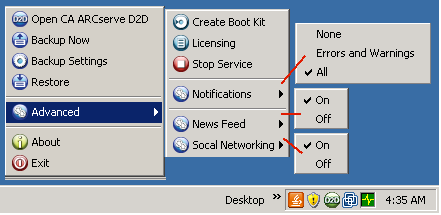
From the CA ARCserve D2D Monitor you can access many of the same task functions that you can access from the CA ARCserve D2D home page. The available tasks that you can launch from the tray monitor are to open the CA ARCserve D2D home page, Backup Now, Backup Settings, Restore, and Advanced Settings. From the Advanced Settings option, you can access additional subordinate options such as Create Boot Kit, Licensing, Start/Stop Service, configure alert Notifications, turn on/off the News Feed, and turn on/off Social Networking.
In addition, when you hover your cursor over the CA ARCserve D2D Monitor icon, a backup status overview message is displayed.

| Copyright © 2010 CA. All rights reserved. | Please tell CA how we can make this information more helpful |