CA ARCserve D2D provides an All Feeds link to let you easily subscribe to RSS feeds from related web sites. Really Simple Syndication (RSS) feeds allow you to stay informed by having relevant and up-to-date information sent to you straight from the web sites that you are interested in. With RSS feeds, you do not need to keep checking back to a particular web site to see if it has been updated. All you need to do is subscribe to the RSS feed, much like you would subscribe to a magazine, but instead of it being delivered to your physical mail box each time the magazine is published, the information is delivered to you (via an RSS feed) every time your subscribed website is updated.
To subscribe and read RSS feeds you need an RSS feed reader. There are many different programs to view RSS feeds from such as Outlook, your internet browser (Internet Explorer, Firefox), web-based readers (My Yahoo!, Google Reader), and desktop-based readers (Feed Demon). After you have subscribed to a feed, the RSS feed reader is able to check for new content at specified time intervals and retrieve the updates.
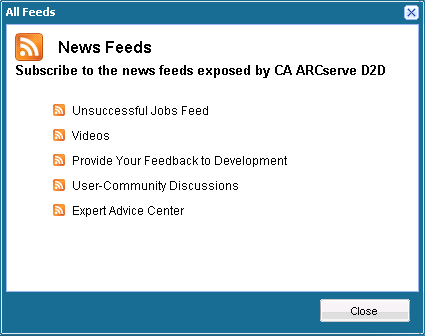
When you click the All Feeds link, the All Feeds dialog opens to let you subscribe to the various CA ARCserve D2D related RSS feeds.
When you subscribe to this RSS feed, you will receive an update notification each time an unsuccessful backup, restore, or copy job is performed on your machine. An unsuccessful job includes all failed, incomplete, canceled, and crashed attempts.
When you subscribe to this RSS feed, you will receive a notification each time the CA ARCserve D2D videos are updated. This RSS feed is only applicable for the YouTube version of the videos.
When you subscribe to this RSS feed, you will receive a notification each time the Get Satisfaction web site information is updated. This site provides access to the CA ARCserve D2D Development team where you can view Frequently Asked Questions, ask your own questions, share ideas, and report any problems.
When you subscribe to this RSS feed, you will receive a notification each time the CA ARCserve D2D online community web site information (Google Group) is updated. This site provides access to interact with the CA ARCserve D2D online community and allows you to share your CA ARCserve D2D experiences with other users.
When you subscribe to this RSS feed, you will receive a notification each time the ARCserve Expert Advice Center web site information is updated. This site provides a convenient landing page where you can then access Tips and Tricks from the CA ARCserve D2D Development team (blogs), product information, group discussions, official CA Support, and other valuable CA ARCserve D2D-related information.
| Copyright © 2010 CA. All rights reserved. | Please tell CA how we can make this information more helpful |